
Original illustration: security engineering for digital assessments.
Research area: Cybersecurity, software engineering and assessment integrity
Audience: Developers, system administrators and academic decision-makers
Review date: November 2026
Abstract
Digital assessment introduces a distinctive security problem: a school must deliver sensitive questions to an authorized student while limiting unauthorized access to resources, communication tools and examination materials. A general-purpose browser is designed to facilitate access to computing resources, not to enforce a closed-book examination policy. Respondus LockDown Browser (LDB) is designed to narrow that gap through a restricted assessment environment integrated with learning management systems.
This report examines defense in depth, native application capabilities, authorization, software integrity, session state, content protection and institutional controls. The conclusion is not that the product is mathematically impossible to bypass. Rather, a correctly deployed assessment browser can reduce common opportunities for misconduct and provide stronger controls than an ordinary browser. The technical examples are original, conceptual implementations; they are not Respondus source code, product internals or penetration-test findings.
1. Introduction: the endpoint security problem
A conventional online assessment operates in a browser on a device whose operating system and surrounding environment are not necessarily controlled by the institution. Browser isolation protects web origins and the operating system, but the same boundary limits the authority of an examination webpage over unrelated applications. Web-based instructions alone cannot establish a reliable system-wide closed-book policy.
Respondus describes LockDown Browser as a purpose-built browser that constrains access to other websites, applications and selected computer functions during an exam. Its LMS integration allows instructors to require the application for particular assessments. [1] [2] The institutional value of this model is the reduction of opportunities for unauthorized actions on the supported examination device, rather than a promise that every form of misconduct has been eliminated.
2. Security architecture and defense in depth
Defense in depth distributes responsibility across independently administered controls. The LMS establishes eligibility and access to examination content; the assessment client applies configured restrictions; the operating system supports the execution environment; and the institution provides oversight and recovery procedures. Each layer addresses a different security property. NIST’s zero-trust guidance provides a useful general framework for evaluating trust decisions, although it is not evidence of any specific Respondus implementation. [5]
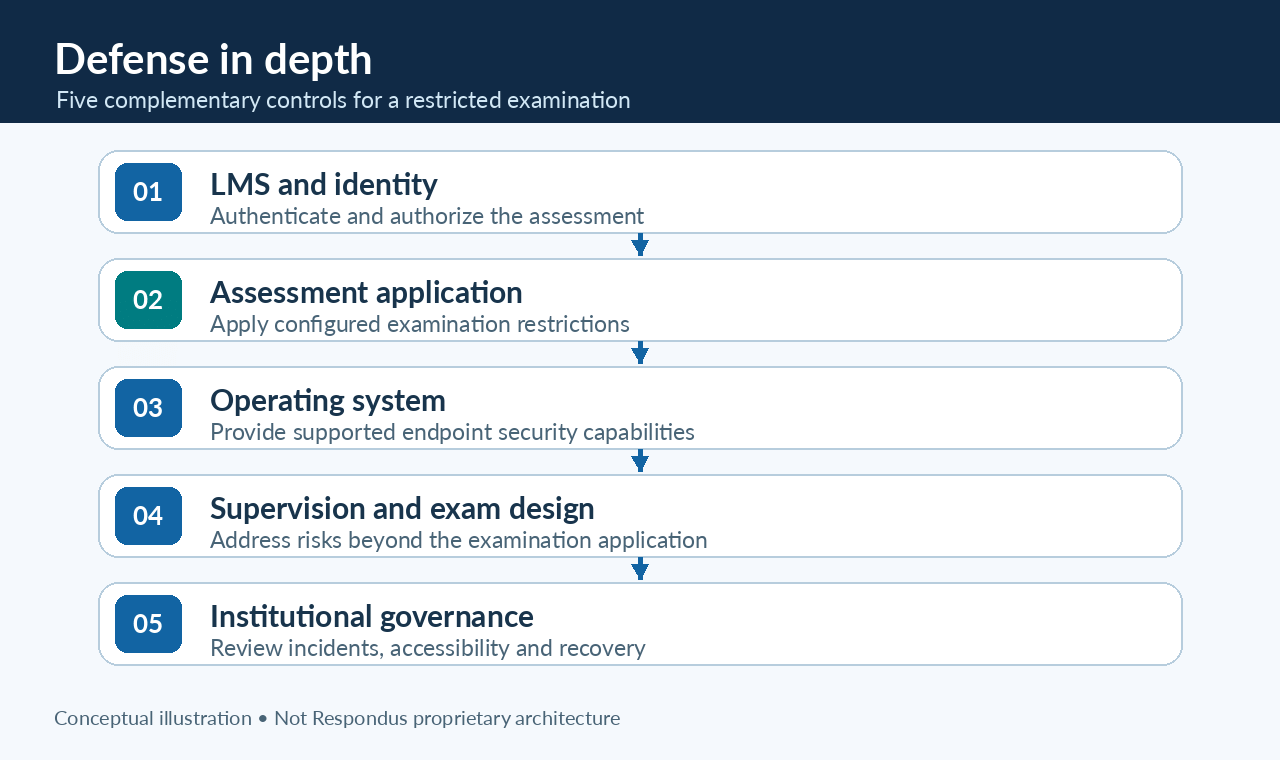
Figure 1. Conceptual defense-in-depth model for digital examinations.
| Layer | Security objective | Institutional responsibility |
|---|---|---|
| Identity and LMS | Authenticate eligible students and protect assessment resources | Configure roles, enrollment and access windows |
| Assessment client | Restrict unauthorized activities on the exam device | Require LDB for appropriate assessments |
| Operating system | Maintain a supported and trustworthy execution environment | Manage updates and approved configurations |
| Supervision | Address physical and identity-related risks | Select appropriate invigilation |
| Governance | Provide fair review, privacy and recovery | Set policy and accountable ownership |
3. Why conventional browsers cannot provide equivalent assurance
Web applications have legitimate security boundaries. A webpage can manage its own interface and request browser-supported capabilities, but it cannot ordinarily set operating-system-wide application policy. A full-screen display is an interface choice, not an endpoint security boundary. Browser UI restrictions should therefore not be confused with enforceable assessment security.
// Generic UI feature: not an operating-system security control.
async function showExamFullscreen() {
    try {
        await document.documentElement.requestFullscreen();
    } catch (error) {
        console.error("Fullscreen unavailable", error);
    }
}
The example demonstrates the limited purpose of a standard web API. Even a well-designed interface still needs trusted backend authorization and appropriate examination controls. It does not authenticate the device or establish an institutionally managed environment.
| Capability | Conventional browser alone | LockDown Browser (supported configuration) |
|---|---|---|
| External browsing | Generally available | Restricted by assessment policy |
| Unrelated applications | No system-wide restriction by webpage | Documented application restrictions |
| Copying and printing | Generally available | Restricted |
| Screen capture | No general system-wide webpage control | Documented restrictions |
| Exam-specific access | Depends on LMS configuration | Can be required by the LMS |
| Physical supervision | Not inherent | Not inherent; requires separate arrangements |
Product capability descriptions are based on Respondus documentation. Exact behavior depends on supported devices, versions and settings. [1] [3]
4. Native applications and operating system integration
A desktop assessment application can use authorized platform capabilities unavailable to a normal webpage. This is an architectural distinction, not proof that the application enjoys unlimited authority over a device. Operating systems define permission boundaries and the supported mechanisms for restricting application behavior.
4.1 Windows security mechanisms
Microsoft Assigned Access provides a documented example of restricted-use Windows configurations. Schools may independently deploy operating system policies on institutionally managed computers to improve consistency. These general technologies should not be represented as confirmed internal dependencies of LDB. [7]
| Windows security concept | Purpose |
|---|---|
| Assigned Access | Restrict a managed device to an approved experience |
| Application control | Enforce institutional software execution policies |
| Least privilege | Limit unnecessary administrative permissions |
| Code signing | Help authenticate distributed executable software |
| Security updates | Reduce exposure to known platform defects |
4.2 macOS assessment application framework
Apple publishes Automatic Assessment Configuration for authorized educational assessment applications. The framework demonstrates how a platform can provide assessment-specific capabilities through a documented API. The following Swift fragment is an educational example, not an assertion about how Respondus implements its macOS client. [8]
import AutomaticAssessmentConfiguration

final class ExampleAssessmentController {
    private var session: AEAssessmentSession?

    func beginAssessment() {
        let configuration = AEAssessmentConfiguration()
        let assessment = AEAssessmentSession(
            configuration: configuration
        )
        session = assessment
        assessment.begin()
    }

    func endAssessment() {
        session?.end()
    }
}
A real application needs approved entitlements, lifecycle callbacks, error handling, accessibility validation and safe restoration of ordinary device use. The framework example illustrates platform-supported policy, rather than a complete deployable client.
5. Authorization and deny-by-default policies
A secure assessment design should define which actions are permitted in a particular context and reject unapproved requests. OWASP recommends server-side authorization checks and explicit access policies. [6] A school should independently verify that exam resources are available only to eligible users within the authorized assessment period.
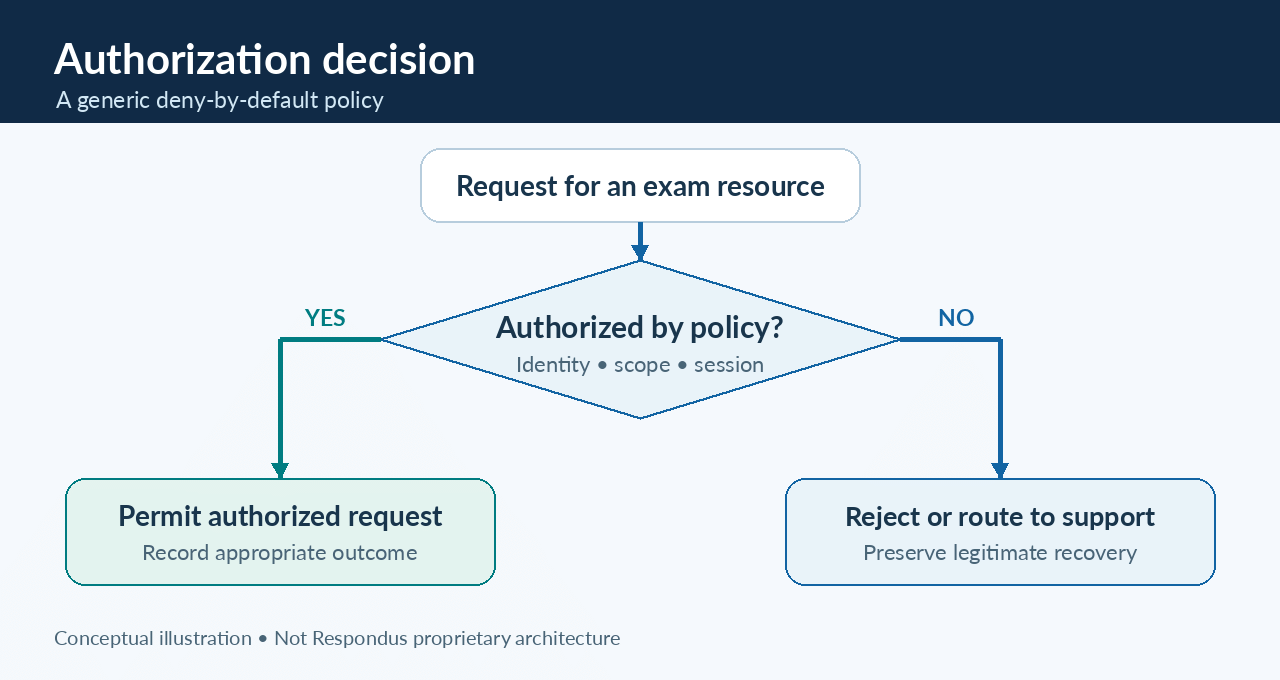
Figure 2. Generic authorization flow; this is not a reverse-engineered LDB workflow.
from enum import Enum

class Role(Enum):
    STUDENT = "student"
    INSTRUCTOR = "instructor"

PERMISSIONS = {
    Role.STUDENT: {"read_assigned_exam", "submit_own_answers"},
    Role.INSTRUCTOR: {"review_assigned_course"},
}

def authorize(role: Role, action: str) -> bool:
    return action in PERMISSIONS.get(role, set())

assert authorize(Role.STUDENT, "submit_own_answers")
assert not authorize(Role.STUDENT, "review_assigned_course")
The example demonstrates default denial and role-scoped actions for a hypothetical assessment backend. Production authorization also needs ownership checks, authenticated identity, course membership and security testing. Roles must be established by trusted services, not accepted from arbitrary client input.
6. Executable authenticity and integrity
A secure software supply chain begins with official distribution, verifiable software publishers and maintained releases. Cryptographic hashing helps detect whether a file differs from an independently trusted reference. Digital signatures provide publisher and integrity assurances when verified correctly through trusted certificate infrastructure. NIST’s secure software development framework provides general guidance on protecting software and responding to vulnerabilities. [15]
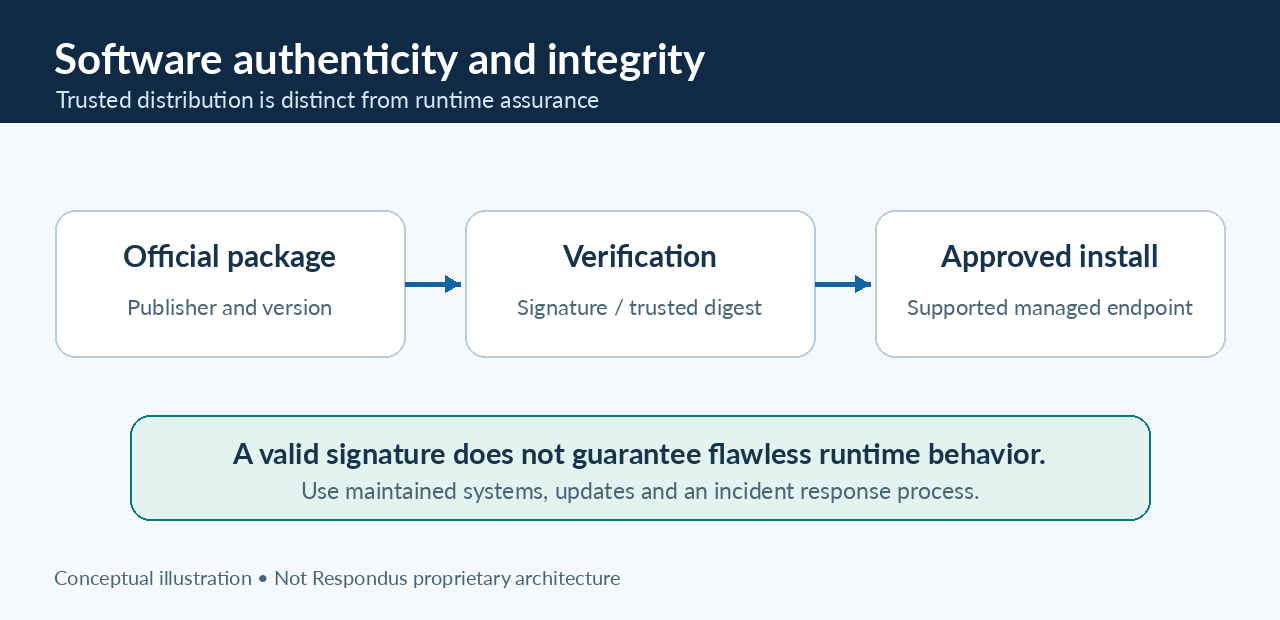
Figure 3. Conceptual software authenticity workflow.
import hashlib
import hmac
from pathlib import Path

def verify_digest(path: Path, trusted_sha256: str) -> bool:
    digest = hashlib.sha256()
    with path.open("rb") as stream:
        for chunk in iter(lambda: stream.read(65536), b""):
            digest.update(chunk)
    return hmac.compare_digest(
        digest.hexdigest(), trusted_sha256.lower()
    )
This function checks a file against a trusted digest; it does not verify a publisher, establish a trusted runtime or establish that a file is vulnerability-free. Schools should obtain software through official institution-approved channels and use supported operating-system signature-verification workflows. No specific Respondus checksum scheme is claimed here.
7. LMS integration and server-side access control
An assessment client does not replace authentication and authorization on the server. The LMS must protect student identities, assessment content, response data and grading functions. Respondus provides LMS-integrated workflows for requiring LDB. [1] [2] Institutional developers should ensure that authorization is consistent across legitimate resource requests, not only when rendering the examination page.
interface TrustedSession {
    studentId: string;
    examId: string;
    enrolled: boolean;
    authorized: boolean;
    expiresAtMs: number;
}

// session is loaded by trusted server middleware.
function authorizeExam(
    session: TrustedSession,
    requestedExamId: string,
    authenticatedStudentId: string,
    nowMs: number = Date.now()
): boolean {
    return session.authorized && session.enrolled &&
        session.studentId === authenticatedStudentId &&
        session.examId === requestedExamId &&
        nowMs < session.expiresAtMs;
}
This is a simplified example of a school-owned access control policy, not a model of the Respondus integration protocol. Production software must independently validate sessions, authorization and resource ownership, and maintain appropriate expiration and revocation rules.
8. Examination session lifecycle
Assessment software benefits from explicit session states. The application should distinguish preparation, validation, active examination, submission, completion and interruption. This reduces ambiguity in how policy is applied and how the student’s legitimate work is preserved.
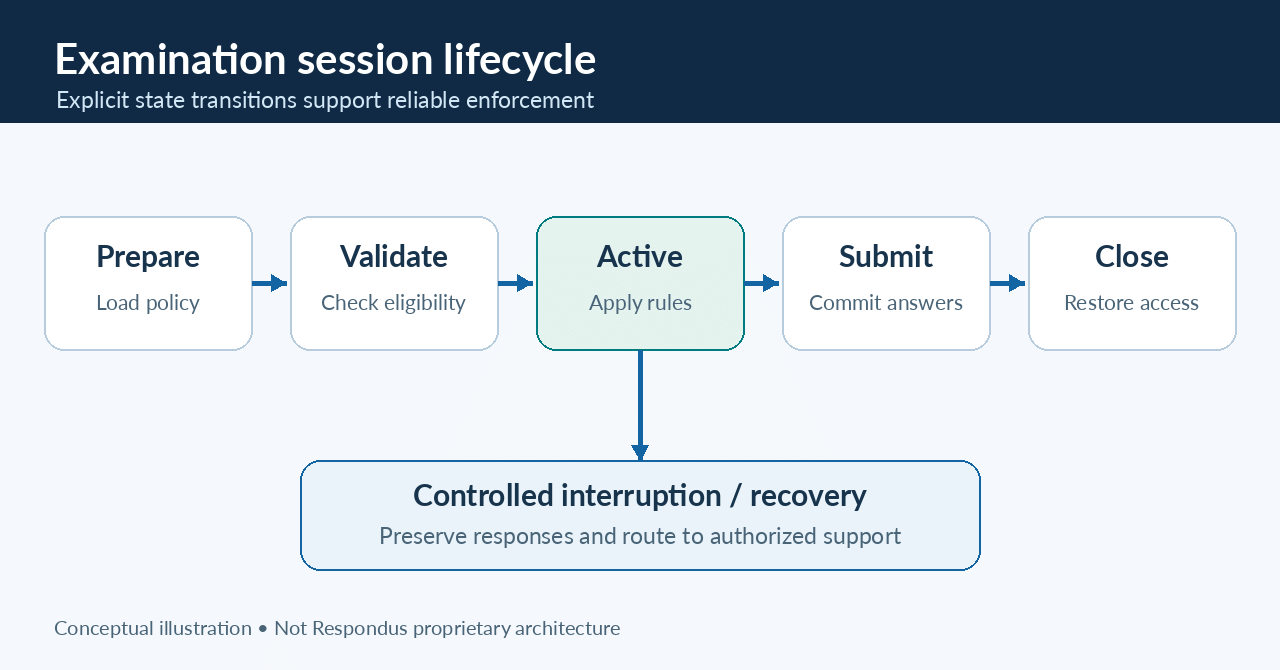
Figure 4. Generic assessment session lifecycle.
from enum import Enum

class State(Enum):
    PREPARE = "prepare"
    VALIDATE = "validate"
    ACTIVE = "active"
    SUBMITTED = "submitted"
    CLOSED = "closed"
    INTERRUPTED = "interrupted"

TRANSITIONS = {
    State.PREPARE: {State.VALIDATE, State.INTERRUPTED},
    State.VALIDATE: {State.ACTIVE, State.INTERRUPTED},
    State.ACTIVE: {State.SUBMITTED, State.INTERRUPTED},
    State.SUBMITTED: {State.CLOSED},
    State.INTERRUPTED: {State.VALIDATE, State.CLOSED},
    State.CLOSED: set(),
}

def transition(current: State, target: State) -> State:
    if target not in TRANSITIONS[current]:
        raise ValueError("Invalid session transition")
    return target
A production state machine needs durable response storage, concurrency control, authenticated recovery and idempotent submission. An unexpected interruption should not automatically become a misconduct allegation. The school should define an authorized support and recovery procedure before using the software for high-stakes assessments.
9. Examination content protection
Question banks may represent substantial institutional investment. Unauthorized distribution can reduce the validity of future assessments and require instructors to recreate materials. Respondus documents restrictions on printing, clipboard use and screen capture. [1] These controls reduce routine opportunities for copying from the assessment device; they cannot guarantee the secrecy of content once it has been presented to a human participant.
Institutions should supplement client controls with scoped access to question banks, secure authoring permissions, appropriate question rotation and careful release of feedback. Protecting questions before and after an examination is as important as protecting them during the test.
How to use Chatgpt in Lockdown Browser Exam
10. Endpoint trust and device management
A bring-your-own-device examination involves a different trust relationship from a supervised computer laboratory. The school may not administer personal devices and may be unable to establish the same baseline configuration. A managed device offers the institution more predictable software versions, account privileges and support arrangements.
LDB should be deployed only on supported platforms, with up-to-date versions and an appropriate support process. Consult the current official requirements rather than assuming compatibility based on a device’s age or operating system name. [3] Avoid assuming any particular device check or internal detection method is present without vendor documentation.
| Trust domain | Institutional control |
|---|---|
| Device baseline | Supported and maintained operating systems |
| Application authenticity | Official installers and approved release channels |
| Identity | Authenticated LMS users and appropriate verification |
| Assessment policy | Documented rules and approved accommodations |
| Operational availability | Practice tests, technical support and recovery |
| Data governance | Least-privilege access and defined retention |
11. Security event logging and audit trails
An institution needs reliable records to investigate technical problems and review assessment incidents. Security logging should be structured, purpose-limited and protected from unauthorized access. It should never collect unnecessary personal information or replace human evaluation.
import json
import logging
from datetime import datetime, timezone

logger = logging.getLogger("assessment_audit")

def audit_event(session_ref: str, event: str, outcome: str):
    record = {
        "time": datetime.now(timezone.utc).isoformat(),
        "session_ref": session_ref,
        "event": event,
        "outcome": outcome,
    }
    logger.info(json.dumps(record))

# Example from a hypothetical school service:
audit_event("opaque-session-001", "submission", "accepted")
This example illustrates structured logging for an institution-owned service. Real deployment requires a configured secure log destination, validation of allowed event types, role-based access and a retention schedule. It is not a Respondus log format.
12. LockDown Browser versus Respondus Monitor
The two products address different aspects of assessment security. LDB restricts the examination device; Respondus Monitor adds webcam-based recording and information for instructor review. The institution should make separate decisions about whether each capability is proportionate to the assessment. [4] [12]
| Feature | LockDown Browser | Respondus Monitor with LDB |
|---|---|---|
| Restricted assessment interface | Yes | Yes, through LDB |
| Navigation and application restrictions | Yes | Yes, through LDB |
| Webcam-based recording | Not a standalone LDB feature | Yes, when configured |
| Instructor review of flagged events | Not equivalent to Monitor | Supported |
| Human misconduct determination | Institutional responsibility | Institutional responsibility |
| Privacy considerations | Evaluate application and LMS data | Additional recording and review considerations |
13. Threat modeling for educational institutions
A useful threat model identifies assets, risks, controls, their owners and residual risk. For examination security, the assets include examination questions, student responses, identities, assessment results and the integrity of the grading process. The institution must evaluate risks beyond the assessment client itself.
| Risk category | Recommended mitigation | Control owner |
|---|---|---|
| Unauthorized online resources | Require configured assessment browser for closed-book exams | LMS administrator / instructor |
| Unauthorized application use | Assessment client and managed-device policy | IT department |
| Question distribution | Content restrictions and protected question banks | Instructor / LMS administrator |
| Unauthorized exam access | Identity and server-side authorization | LMS administrator |
| Identity or external assistance | Proportionate supervision and review | Academic administration |
| Technical disruption | Practice assessment, support and recovery plan | IT department |
| Incorrect allegations | Human evaluation and appeals | Academic integrity office |
| Excessive personal data collection | Privacy review and retention limits | Data protection office |
14. Why layered restrictions raise the cost of misconduct
The objective of practical security is to reduce the likelihood and consequences of unauthorized activity. A controlled assessment client can remove routine access to resources that are available in an ordinary browser. Independent institutional controls then address risks that are not within the client’s authority. This is a stronger design than treating a single product as a complete security boundary.
The same design must consider availability and fairness. A system that prevents legitimate students from completing assessments due to technical or accessibility problems fails a central institutional requirement. Effective security balances prevention, reliable operation, and appropriate recovery.
15. What is known, inferred and unverified?
| Evidence category | Examples | Interpretation |
|---|---|---|
| Public vendor documentation | Restricted browsing, copying, printing and application access | Product capabilities described by Respondus |
| Platform documentation | Microsoft restricted-use mechanisms and Apple assessment APIs | Examples of general operating system capabilities |
| General security engineering | Authorization, integrity checks and state machines | Illustrative patterns; not LDB source code |
| Independent assessment research | Studies of remote proctoring and exam performance | Contextual evidence, not product-specific assurance |
| Unverified proprietary internals | Exact product implementation and detection logic | No claim is made about these details |
This distinction is essential to the credibility of a developer-focused institutional report. Public-facing behavior is not proof of any particular implementation. Product-specific claims should be validated through vendor documentation, authorized evaluation and contractual assurances where appropriate.
5 Best Ways On How To Bypass Lockdown Browser
16. Academic evidence and its limitations
A randomized field experiment published in the Journal of Computing in Higher Education (2024) examined webcam monitoring during online examinations. The monitored group obtained lower scores under the studied conditions, and the authors considered academic dishonesty as an explanation. [11] The study concerns webcam monitoring, not an independent penetration test of LDB. Lower scores by themselves do not prove that any individual student engaged in misconduct.
A separate randomized study of virtually proctored examinations in Dutch higher education investigated implementation barriers. [14] That research reinforces the need to examine operational feasibility rather than assuming that security software will work equally well in every setting. Local conditions, assessment design, support, student access and the type of supervision all matter.
For procurement, the appropriate conclusion is conditional: assessment controls can be valuable for closed-book or high-stakes testing, but effectiveness and student impact must be evaluated in the institution’s own environment. No study cited here establishes a numerical bypass-resistance rate for Respondus.
17. Is bypassing LockDown Browser impossible?
No absolute impossibility claim is justified. Software can contain defects; supported platforms and configurations change; and some academic integrity risks fall outside the examination client’s scope. Security assurance requires a clearly defined threat model and evidence that controls meet the intended requirements.
| Security function | Meaning for assessment |
|---|---|
| Prevention | Restrict prohibited activity within the defined scope |
| Detection | Identify potentially relevant security or operational events |
| Response | Handle events and route them to authorized staff |
| Recovery | Preserve student work and restore legitimate access |
| Assurance | Demonstrate that controls operate as required |
An institution should adopt LDB for the scope of controls it provides and validate their effectiveness, not because the software is assumed to be invulnerable. The appropriate question is whether the proposed combination of controls reduces risk enough for the assessment’s stakes.
18. Recommended institutional deployment architecture
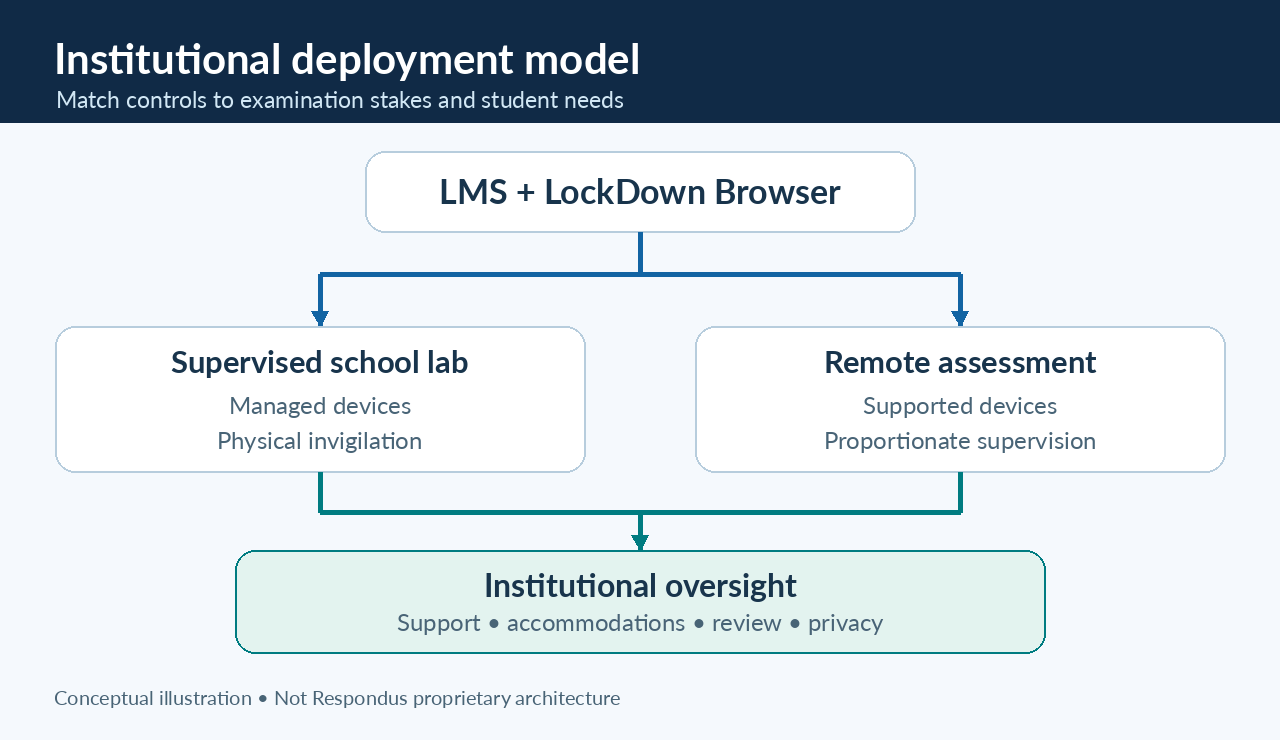
Figure 5. Proposed deployment architecture for a school.
18.1 High-stakes supervised assessments
Where practical, use managed laboratory computers with standard configurations, appropriate student account privileges and human invigilation. This allows the institution to apply its own endpoint policies alongside LDB and to provide immediate assistance when problems occur.
18.2 Remote assessments
Use a practice assessment before graded testing. Establish a procedure for supported devices, connectivity interruptions, alternative arrangements and student accommodations. Consider Monitor only when its additional capabilities are justified by the stakes and privacy requirements. [4] [9] [12]
18.3 Operational maintenance
Assign an owner for LMS integration and software updates, maintain a support knowledge base, and communicate the examination policy to students well before testing. The vendor’s help center provides troubleshooting resources, but the institution should maintain its own escalation and recovery procedures. [13]
19. Acceptance testing and deployment checklist
Before broad deployment, the IT department should test the documented controls using authorized practice assessments, representative supported hardware and agreed success criteria. The following is an institutional acceptance checklist, not a claim that any of the tests have already been performed.
| Acceptance criterion | Expected result | Owner |
|---|---|---|
| Protected examination access | LMS enforces configured assessment access requirements | LMS administrator |
| Navigation and application policy | Documented restrictions function as intended | IT department |
| Content protection | Documented restrictions are validated | IT department |
| Submission and recovery | Responses are preserved and legitimate recovery is supported | IT / instructors |
| Supported devices | Representative configurations complete a practice exam | IT department |
| Accessibility | Approved accommodations are verified | Accessibility office |
| Privacy | Collection, access and retention policies are approved | Data protection office |
| Incident review | Human review and appeals are documented | Academic administration |
| Support readiness | Students have clear instructions and escalation routes | Student support |
How To Bypass Lockdown Browser Without Being Detected
20. Privacy, accessibility and academic fairness
Security measures must be proportionate. An institution should provide clear notice about data collected, its purpose, retention, recipients, and how students can request help or challenge a decision. Respondus publishes privacy and accessibility information for institutional evaluation. [9] [10]
Approved assistive technologies and accommodations should be tested rather than assumed to work. A student with a disability, an unsupported device, or unreliable connectivity should have access to a meaningful alternative when appropriate. Automated proctoring flags should be reviewed in context and never treated as conclusive evidence of wrongdoing on their own.
21. Institutional benefits and procurement considerations
| Objective | Potential benefit | Validation requirement |
|---|---|---|
| Academic integrity | Reduced routine access to unauthorized resources | Pilot documented restrictions |
| Consistency | Standardized examination conditions | Evaluate platform and configuration differences |
| Question protection | Reduced ordinary copying and printing | Review assessment content lifecycle |
| Operational efficiency | LMS-integrated workflow | Measure setup and support burden |
| Fairness | Consistent rules and approved exceptions | Evaluate accessibility and appeals |
| Cost management | Defined institutional deployment model | Compare licensing, staff and support costs |
The school should request current licensing terms, integration documentation, data-processing agreements where relevant, support commitments, accessibility information and a vulnerability disclosure process. Evaluate total operational cost, not only the software license. Procurement should be contingent on a successful pilot and an approved governance policy.
22. Qualitative risk assessment
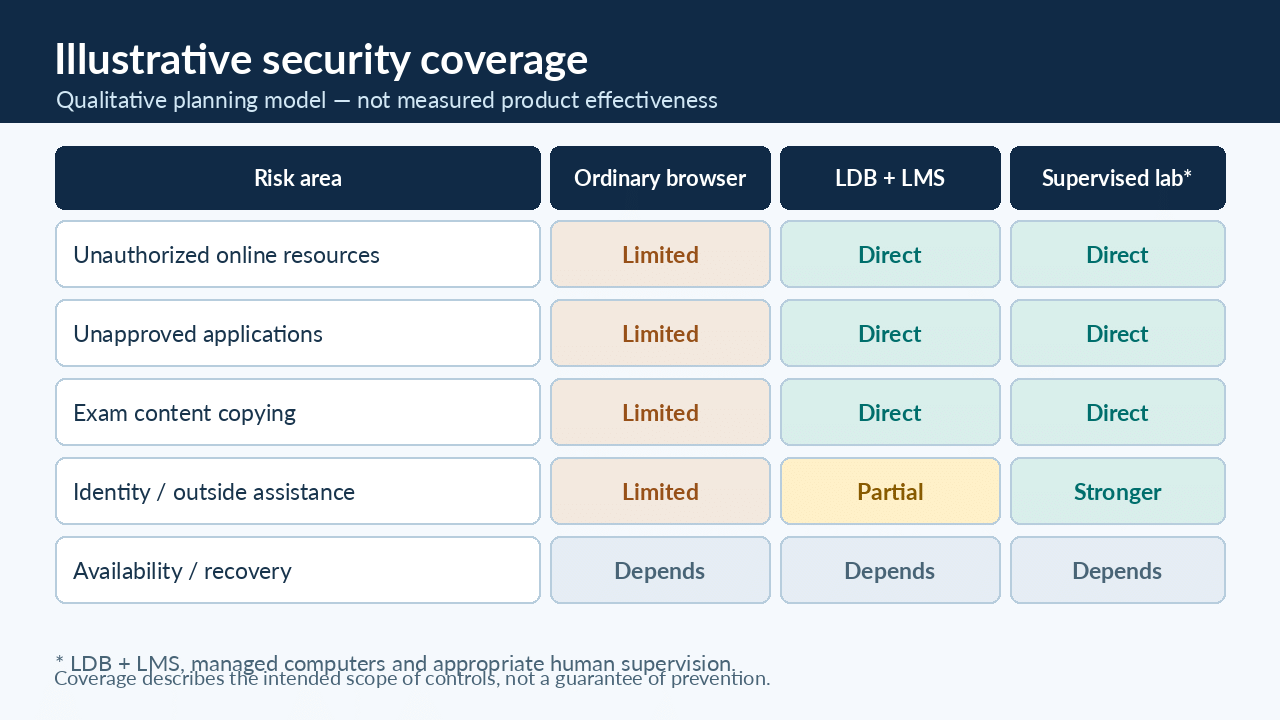
Figure 6. Illustrative control coverage, not a quantitative security test.
The matrix describes where direct or partial controls are intended to operate. It does not represent measured attack success rates, guaranteed protection or a vendor security certification. A supervised laboratory may provide stronger overall control when appropriately managed, while remote examinations may offer greater flexibility. Schools should document residual risk and determine whether it is acceptable for each assessment type.
23. Recommended pilot and evaluation metrics
A small pilot should include instructors, IT staff, accessibility specialists and a representative group of students. Define metrics before testing so the decision is not driven solely by anecdotes. The institution should also compare alternatives such as supervised labs, redesigned open-resource examinations and oral follow-up assessments where appropriate.
| Metric | How to evaluate |
|---|---|
| Successful completion rate | Completed legitimate attempts divided by started legitimate attempts |
| Technical incident rate | Support incidents per 100 examination attempts |
| Recovery success | Resolved interruptions without loss of student responses |
| Accessibility readiness | Approved accommodations successfully tested |
| Control acceptance | Documented security checks passed against the agreed test plan |
| Review quality | Timely human review with documented outcomes |
| Student experience | Feedback on instructions, accessibility and support |
Avoid treating the number of automated flags as the number of confirmed misconduct incidents. Flag counts are not an adequate measure of security effectiveness. The final decision should combine technical control validation, operational data, student experience and academic judgment.
24. Conclusion
Respondus LockDown Browser is a credible candidate for institutions that need a restricted digital assessment environment. Its advantage over an ordinary browser is the documented scope of its assessment-oriented restrictions and its integration with educational systems. General security engineering explains why these controls can be useful, but it does not establish the product’s proprietary implementation or absolute resistance to every unauthorized action.
How to Bypass Respondus Lockdown Browser in 2026 | How to Cheat Respondus Lockdown Browser in 2027
Recommendation: Adopt LDB selectively for closed-book and high-stakes examinations, subject to a successful institutional pilot, documented privacy and accessibility review, maintained software and a clearly defined support process. Use supervised managed devices where the stakes justify the additional controls. The goal is dependable assessment integrity, not an impossible guarantee of flawless security.
25. References and technical documentation
- Respondus — LockDown Browser for higher education
- Respondus — LockDown Browser resources
- Respondus Support — LockDown Browser computer requirements
- Respondus — Monitor
- NIST — Zero Trust Architecture (SP 800-207)
- OWASP — Authorization Cheat Sheet
- Microsoft — Assigned Access overview
- Apple Developer — Automatic Assessment Configuration
- Respondus — Accessibility
- Respondus — Privacy Center
- Academic dishonesty and monitoring in online exams: a randomized field experiment (2024)
- Respondus — Monitor resources
- Respondus — Help Center
- The effects of implementation barriers in virtually proctored examination: a randomised field experiment
- NIST — Secure Software Development Framework (SP 800-218)
Research limitations: This report is based on public documentation, selected academic studies and general software security engineering principles. No Respondus source code, confidential architecture, independent penetration test or school-specific pilot data was examined. All diagrams and code are original conceptual illustrations. Product configurations and capabilities may change; verify requirements before deployment.