Updated: November 20, 2026 | Student troubleshooting guide
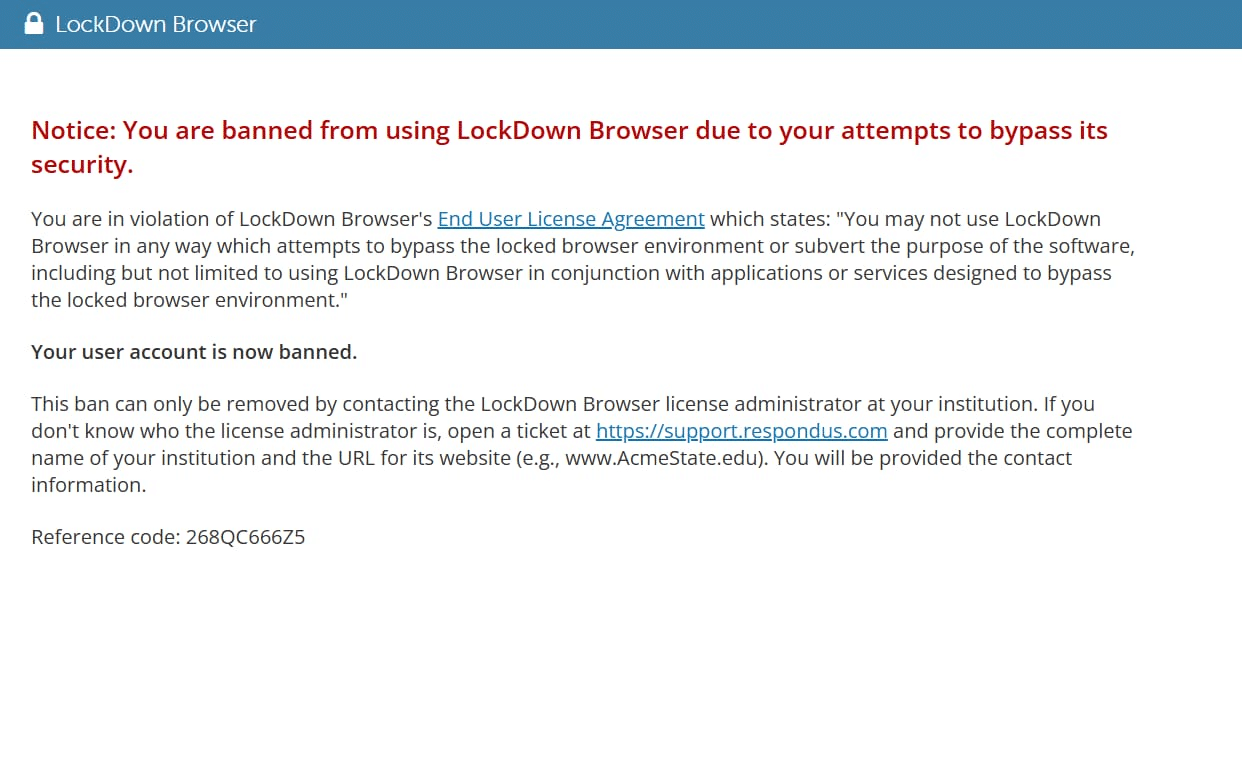
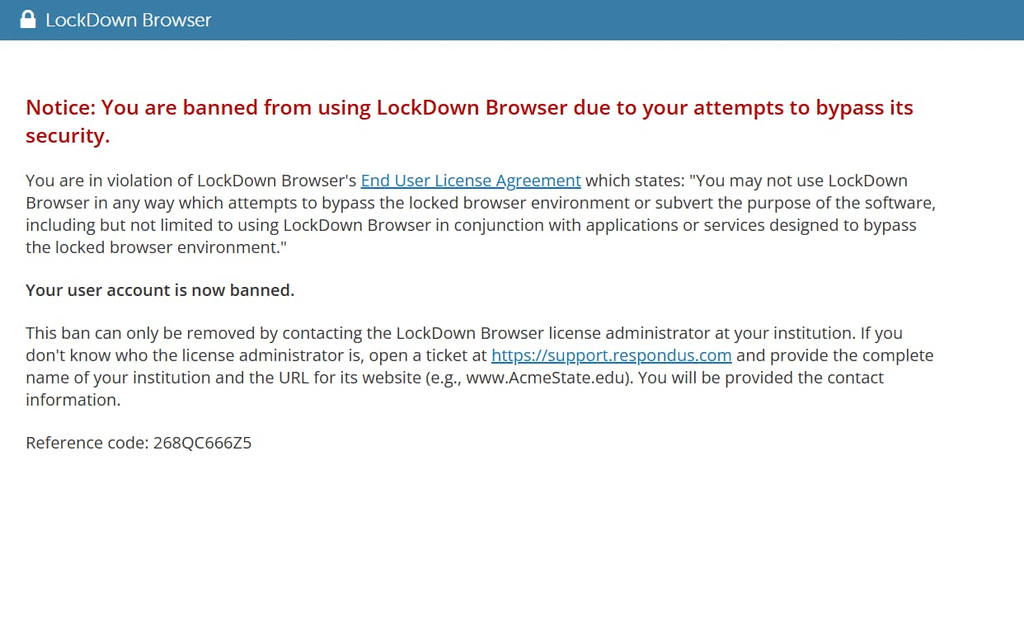
You open Respondus LockDown Browser for an exam, expecting to answer questions. Instead, an unexpected notice says your account has been banned or your exam access is restricted. What happened? Can you still take the test? Most importantly, how do you get access back?
Join our Discord , we will help you to be unbanned https://exampiebypass.com/contacts/
The first thing to understand is that a real Respondus ban is different from an exam flag, a browser crash, or an instructor’s exam restriction. Each situation has a different solution. This guide explains the differences, what Respondus officially says causes account bans, and how students can request a fair review.
Quick answer: Respondus says a LockDown Browser ban is a last-resort safeguard used when a student attempts to use an application or technique specifically designed to circumvent its security protections. A ban applies to the student’s account, not the computer. After the institution investigates, only its LockDown Browser license administrator can remove the ban. An ordinary webcam flag or technical error is not, by itself, proof that the account has been banned.
How to Bypass Respondus Lockdown Browser in 2027
1. Can Respondus LockDown Browser really ban a student?
Yes. Respondus maintains an official “LockDown Browser and Banned Users” support page. According to that page, a ban can prevent a student from accessing an online exam that requires LockDown Browser. In some cases, the exam may begin briefly and then end. The restriction follows the student account, which means changing laptops does not resolve it.
This is different from a university giving a student an academic penalty. Respondus can restrict access to exams through its software, while the college or university separately decides whether an academic-integrity violation occurred and what consequences, if any, follow under its own policies.
2. What causes a student to be banned from LockDown Browser?
Respondus’s published explanation is specific: it describes bans as a last-resort security safeguard for attempts involving applications or techniques designed to circumvent LockDown Browser’s protections.
Examples of the *types of security concerns* that may be relevant include attempts to defeat exam restrictions on other applications, unauthorized remote-access or screen-sharing behavior, or tools made to undermine the protected test environment. These examples do not mean every blocked application, unsupported setup, or warning automatically results in a ban. Respondus does not publish a complete student-facing list of exact triggers or detection rules.
A student might also violate an instructor’s exam rules—for example, by using unauthorized materials. That can lead to an academic review or penalty, but it should not be described as an automatic Respondus account ban. The software restriction and the institution’s disciplinary decision are separate questions.
How To Bypass Lockdown Browser without being detected
3. Banned, flagged, blocked, or crashed: know the difference
Account ban: An access restriction associated with the student’s account. The institution must investigate, and the Respondus license administrator is the person authorized to lift it.
Respondus Monitor flag: If webcam proctoring is enabled, Respondus Monitor may mark events for an instructor’s review, such as when a student moves out of frame or another person appears. A flagged recording is not the same thing as an account ban, and an automated flag alone does not establish cheating.
Blocked launch or access error: The browser may refuse to start because it detects an incompatible environment or because exam settings, application conflicts, or connectivity prevent access. For example, Respondus says virtual-machine environments are not permitted for LockDown Browser exams. A launch warning does not automatically establish an account ban.
Technical crash: A frozen screen, interrupted connection, outdated installation, or application conflict can stop an exam session. Such a failure should be documented and reported, not automatically interpreted as misconduct.
Instructor or LMS restriction: A professor may limit exam attempts, require a password, set a deadline, or lock an assessment in Canvas, Blackboard, Moodle, or another system. Those rules are managed through the course and are not necessarily Respondus account bans.
4. How to get unbanned from Respondus LockDown Browser: step by step
Step 1: Read and record the exact message
Do not guess from the fact that an exam closed. Write down what the message actually says. If allowed, take a screenshot or clear photo. Record the date, time, course, exam title, and whether the notice appeared before the exam, during the exam, or after an interruption.
Step 2: Inform your instructor immediately
Tell your instructor you cannot access the assessment and ask for guidance before the deadline passes. Keep your message factual: what happened, when it happened, and what the screen displayed. Ask whether a temporary extension or alternative supervised exam arrangement is available while the issue is reviewed.
Step 3: Contact your school’s IT help desk or examination office
Ask the help desk to determine whether this is an actual Respondus account ban, an instructor-controlled restriction, or a technical launch problem. Provide the screenshot and basic device information, but do not send passwords or unnecessary personal data.
Step 4: Request an institutional review of the restriction
If the school confirms an account ban, ask for the proper investigation or appeal process. You can respectfully request a description of the alleged issue, an opportunity to explain your circumstances, and a review of any relevant records the school can disclose under its policies.
Step 5: Ask for the LockDown Browser license administrator
Respondus says only the institution’s LockDown Browser license administrator can remove a ban, after the institution has completed its investigation. Your professor or IT technician may be able to help you reach this administrator, but a professor alone may not have the authority to remove the software ban.
Step 6: Provide truthful supporting information
If you suspect a background program, an unusual pop-up, a borrowed computer, or a legitimate accessibility application is relevant, explain that clearly. This is a reason to request investigation—not proof that a false positive occurred. Preserve the original error notice and any support-ticket numbers.
Step 7: Follow up and confirm access before your next exam
Once the school says the restriction has been resolved, confirm that you can launch an approved practice quiz or another permitted test. Do not assume that reinstalling the software, logging in with a different account, or changing devices removes the ban.
5. Can students be banned by mistake?
Students sometimes report believing a security restriction was incorrect. Such reports deserve careful investigation, but an online account of a disputed ban cannot establish what Respondus detected in a particular case. Neither the student nor an outside blogger can verify the technical cause without the relevant evidence.
If you believe the restriction is mistaken, ask the institution to review the case fairly. Provide a timeline, screenshots, ticket numbers, and any relevant facts about the computer’s normal configuration. If an academic-integrity accusation is also involved, follow your institution’s written appeal procedure and relevant deadlines.
6. What should you NOT do after receiving a ban?
Do not try to bypass the restriction, borrow another student’s account, or use unauthorized tools. Respondus says account bans follow the account, so switching machines will not remove one. Avoid deleting potential diagnostic evidence or making major system changes before the help desk tells you what information it needs. Also avoid publicly posting your account credentials, student ID, or private exam footage.
You can still use ordinary troubleshooting for a confirmed technical error—for example, contacting the help desk, updating the browser from your school’s official link, and running a system check. But technical troubleshooting should not be misrepresented as a way to override an account-level ban.
Bypass All Proctored Exams EXAMPIE BYPASS:
7. A sample email students can send to request a review
Subject: Request for Review of Respondus LockDown Browser Access Restriction
Hello [Instructor or Support Team],
I attempted to access [exam name] for [course] on [date] at approximately [time], but LockDown Browser displayed the following message: “[exact error message].” My exam access was interrupted, and I would like to understand whether this is an account-level restriction or a technical issue.
I have attached a screenshot and can provide the device and session details needed for an investigation. I respectfully request a review of the restriction and guidance on the next steps. If this is an account ban, could you please direct my case to the institution’s Respondus LockDown Browser license administrator after the appropriate review?
Because the exam deadline is [date/time], please also advise whether a temporary extension or an approved alternative assessment is possible.
Thank you for your assistance.
[Student name]
[Course and section]
[Support ticket number, if available]
8. Frequently asked questions
Does looking away from the webcam get you banned?
Looking away may contribute to a Respondus Monitor event being flagged in some proctored exams, but an ordinary video flag is not the same as an account ban. Instructors should interpret recordings and other information in context.
Can a professor personally unban me?
A professor may help initiate a review, but Respondus says only a LockDown Browser license administrator can actually remove a user ban after an institutional investigation.
Will reinstalling LockDown Browser remove my ban?
No. According to Respondus, bans apply to user accounts, not devices. Reinstalling may fix a broken installation, but it does not independently lift an account-level ban.
Can I use another laptop to get unbanned?
No. Changing devices does not change the banned account’s status. If your problem is instead a device compatibility issue, your school’s IT team may recommend another supported machine.
Is a webcam flag proof that I cheated?
No. Respondus Monitor flags events for instructor review; a flagged event alone does not prove misconduct. School academic-integrity procedures govern how alleged violations are evaluated.
Will my grades be automatically canceled if I am banned?
Not necessarily. A ban affects access to LockDown Browser exams. Grades, retakes, deadlines, and academic penalties are determined under the institution’s own policies.
How long does a Respondus ban last?
Respondus’s public ban FAQ does not state a universal ban duration. The institution must complete its investigation, and its license administrator can then remove the restriction. Ask your school about the timing of your specific case.
Can Respondus Support remove my ban directly?
Respondus’s instructions identify the institution’s license administrator as the only person authorized to remove a ban. Respondus Support may help identify the appropriate school administrator when needed.
What if LockDown Browser suddenly closes but I never saw a ban notice?
A crash or termination is not enough to establish a ban. Record any error message, check for internet or software issues with your help desk, and ask the instructor to verify the exam attempt.
Can an academic-integrity appeal help me regain access?
If your college links exam access to an integrity investigation, following its appeals process may be an important part of resolving the case. However, the exact procedure depends on the institution, and a successful appeal does not itself substitute for the license administrator’s removal of the Respondus restriction.
Final takeaway
A Respondus LockDown Browser ban is serious, but students should not assume that every flag, warning, or exam crash means they have been banned. Confirm the message, document what happened, contact your school promptly, and ask for the institution’s review process. A verified account ban cannot be undone by changing computers; after review, only the institution’s authorized LockDown Browser license administrator can remove it.
If you are facing an exam deadline, act early. A clear record of the problem and professional communication with your school are far more useful than experimenting with workarounds.
Sources and further reading
1. Respondus — LockDown Browser and Banned Users: https://web.respondus.com/support/ban/
2. Respondus — New Features for Respondus Monitor (automated video flags and Help Center): https://web.respondus.com/new-features-for-respondus-monitor/
3. Respondus — Help Center for LockDown Browser and Respondus Monitor: https://web.respondus.com/monitor-helpcenter/
4. Respondus Support — Virtual machine warning: https://support.respondus.com/hc/en-us/articles/4409604116123-I-receive-a-warning-The-browser-cant-be-used-in-virtual-machine-software-such-as-Virtual-PC-VMWare-and-Parallels
5. Respondus Support — LockDown Browser froze during a test: https://support.respondus.com/hc/en-us/articles/4409607186203-LockDown-Browser-froze-during-a-test-and-I-cannot-exit
Suggested SEO title: Why Does Respondus LockDown Browser Ban Students? How to Get Unbanned (2026)
Suggested URL slug: respondus-lockdown-browser-ban-causes-how-to-get-unbanned
Meta description: Learn why Respondus LockDown Browser bans student accounts, how bans differ from webcam flags, and the official steps to request a review and regain exam access.
